Earlier this month we shipped the client portal: a branded space where your clients receive their deliveries instead of hunting through email attachments. We said the obvious next step was letting them start the work there too. That step is live.
Your client fills a form, not your inbox
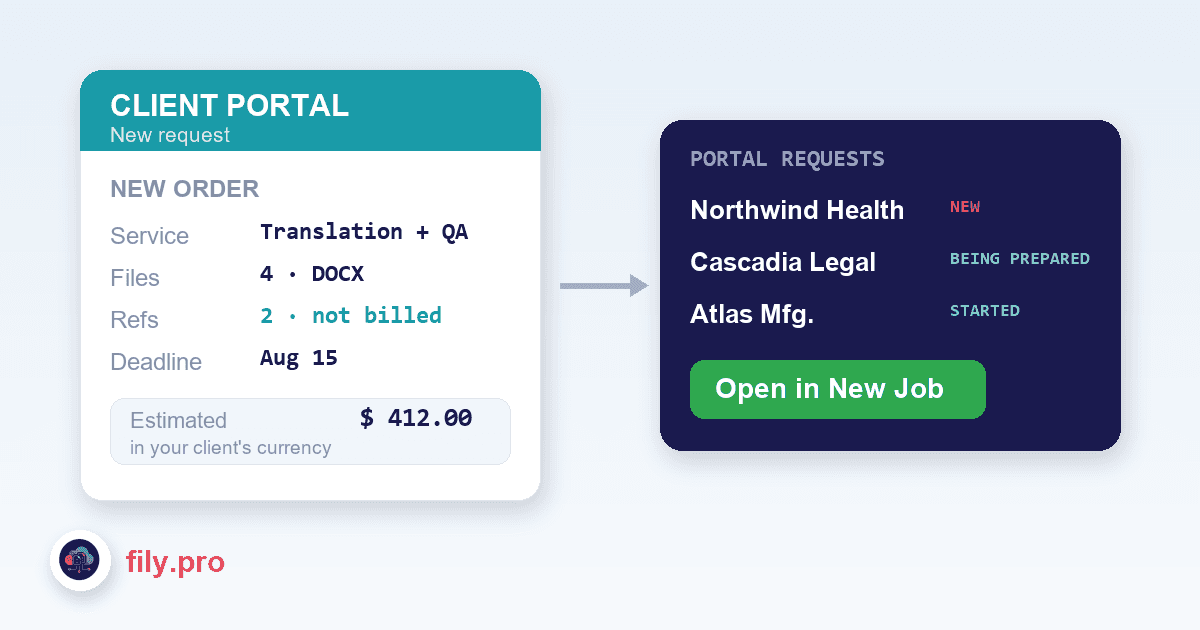
A client can now place a request directly in the portal: upload the files, pick the service — under the name you gave it, not our internal one — choose languages, and set a deadline. No email thread, no “please find attached”, nobody on your team retyping it into a project screen.
Reference files are a first-class part of the request. A style guide, a previous translation, a signed glossary — your client attaches them alongside the work files and marks them as reference. They travel with the job so everyone sees them, but they are never counted, never charged, and never translated as if they were source documents. Anyone who has ever accidentally quoted a forty-page reference PDF knows exactly why that distinction is load-bearing.
Requests land in a queue, not a void
On your side there is a Portal requests page that works like the jobs list you already use: one row per request, sorted by how close the deadline is, with a badge in the sidebar the moment something new arrives. A request cannot sit unseen in somebody’s mailbox, because it was never in a mailbox.
Fulfilling a request does not mean approving it blind. “Open in New Job” takes everything the client entered — files, languages, service, deadline, references — and pre-fills the same job form your team uses every day. The person approving sees exactly what is about to run, adjusts whatever needs adjusting, and only then commits. The request and the job it became stay linked in both directions.
The client watches it move
- The request shows “Being prepared” as soon as your team picks it up.
- An email goes out when the work actually starts — not when it is promised.
- Another goes out when the review is approved and the delivery is waiting in the portal.
- “Ask about this order” attaches the question to the order itself, instead of starting one more loose email thread.
Deliveries, file by file
A fifty-file batch no longer has to be all-or-nothing. You can now release finished files individually as they clear review, and the client’s view of the batch expands just like your jobs list does — each file with its own status badge. When the last one lands, the batch is simply complete; nobody waited on file 50 to get file 1.
And one screen per client
There is now a 360 view per client: their requests, their jobs, their deliveries and their activity in one place. “How are things going with this account?” is one click, not an investigation across four screens.
If the portal is already switched on for your organization, all of this is in it today. If it is not, ask your Account Manager — it takes minutes, and it is your logo on the door.
Want this in your workflow? Try Fily with one file — no card, no demo form.