Product Update · August 4, 2026 · 4 min read
A portal for your clients, under your brand — and still under your control
If you run an LSP, you already know the loop: a client emails four files and a deadline, someone opens them to count words, someone quotes, the client approves by reply, and only then does the work start. Multiply by forty clients and that loop is a full-time job nobody was hired to do.
The obvious fix — give clients direct access to your tooling — is the one most agencies refuse, and they are right to. Direct access usually means handing over the keys: uncontrolled spend, jobs you did not price, and your vendor's logo where yours should be.
So we built the portal around the opposite assumption: your client gets self-service, you keep control of everything that matters.
It is your portal, not ours
Each organization gets its own client portal with its own branding — your logo, your primary color, your name, your support address — configured by you from your dashboard, with a live preview. You invite your clients by email; they never create a Fily account, and they never see Fily branding. As far as your client is concerned, this is your platform.
Every order is a request, not a command
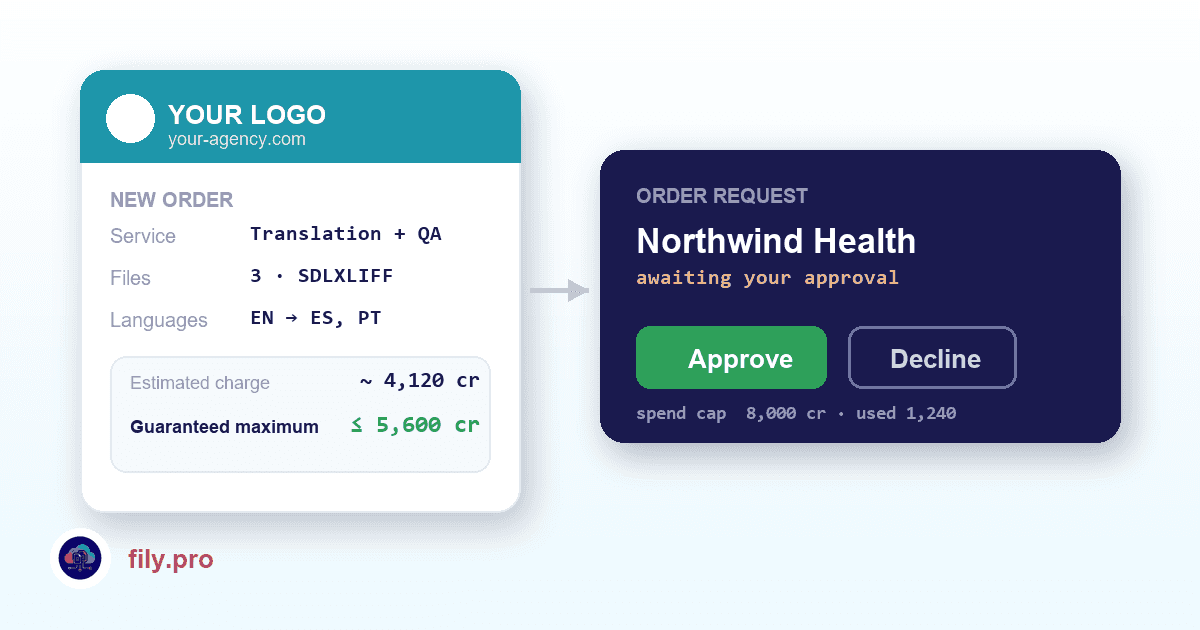
This is the design decision we are proudest of. When a client submits work, it does not go straight into production. It arrives in your dashboard as a request: file, service, languages, and a price — and you approve or decline it. Nothing is queued, nothing is charged, until you say so.
For clients you trust and volumes you have already agreed on, auto-approval can be switched on per client access. It is off by default, because the safe default should be the one where nothing happens without you.
A quote with a ceiling you can stand behind
“Up to N credits” based on a raw word count is not a quote. So the portal analyzes the actual file: internal repetitions, and exact matches against your own translation memory for that client. The client sees two numbers — an estimated charge, and a guaranteed maximum.
The maximum is the binding one, and every assumption behind the estimate is deliberately conservative: coarser segmentation than the engine uses, discounts counted at a fraction of their real value, a margin on top, and no estimate at all when the file gives us no signal. The result is a number that can only surprise you downward. Your client gets a real answer immediately; you never get a bill you did not expect.
Guardrails, not good intentions
- A spend cap per client access — checked when the order is placed and again when you approve it.
- Per-client service catalogs: each access only sees the services you enable, including the custom pipelines built for your organization.
- Your clients see their own work and nothing else — not your other clients, not your volumes, not your configuration.
- Editable access: change services, cap or pricing on an existing client without revoking and re-inviting.
Terminology, from the people who actually know
Your client's subject-matter experts see the glossary and style guide that apply to their content, and can propose terms. Proposals land in your dashboard for approval — they never rewrite your glossary on their own. The people who know that the brand says “member” and not “client” get a way to tell you, without getting write access to your terminology.
And it tells everyone what happened
A new request emails your team. A decline emails your client with your reason. A finished job emails your client that it is ready — with a link to the portal, never an attachment, so deliverables stay behind authentication. No one has to remember to send the status email.
It is live now. Ask your Account Manager to switch it on for your organization and invite your first client — setup is a logo, a color and an email address.
Want this in your workflow? Try Fily with one file — no card, no demo form.